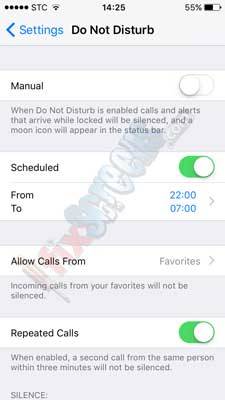
(1) Have Your Own Peaceful Time By Scheduling Your “Do Not Disturb” Intervals
This feature enables us to have some peaceful time. It blocks calls, message and texts while it is on.
How to enable it?
- Go to “Settings” then to “Do not Disturb”.
- You can easily toggle it on and enable it.
- It will be activated till you manually disable it again.
you also can schedule when to enable and disable it by tapping on “Scheduled” then you’ll choose “From” and “To” to choose the period through which this mode should be on.
Also, you can make exceptions for this rule. You can allow calls from your favorites which can be found on the same screen “Allow Calls From”.
(2) Go Back To The Old Days With 4-Digit Passcode Instead Of The New 6-Digit Passcode
Back in the old days, loyal iPhone users used to have 4 digits passcodes but now modern iPhone force a 6-digit passcode by default.
No one debates that it provides more security to your device, but some users might find it disturbing and want to get back to the 4-digit code.
Here is how to do that.
- On your iPhone, go to “Settings” then to “Touch ID & Passcode”.
- You’ll be prompted to enter your existing 6-digit passcode.
- Enter it and then go to “Change Passcode”.
- You’ll need to enter your old passcode again.
- When you are prompted to enter your new passcode, you’ll find a link saying “Passcode Options”.
- Tap it and choose “4-Digit Numeric Code”.
Hooooorrrray!!
Now, you can enter your new 4-digit passcode like the old days.
(3) Save The Day And Tell Your Phone When It Should Start Low-Power Mode
One of the new features that was introduced in iOS 9.0 is the “low-power mode”.
This mode disables some of the background apps and services such as mail fetch and Hi Siri to improve energy-efficiency.
By default, it automatically turns on when the battery reaches 20% to reduce power consumption by your device.
Here’s how to do that.